
Talent Pool Portal
Give your clients first access to talent.
Your clients want the quickest access to talent, not a list that's out of date by the time it lands. The Talent Pool Portal gives them a live, anonymised view of your available candidates and contractors coming off contract. You control who sees what, you see who's looking, and you charge them for access.
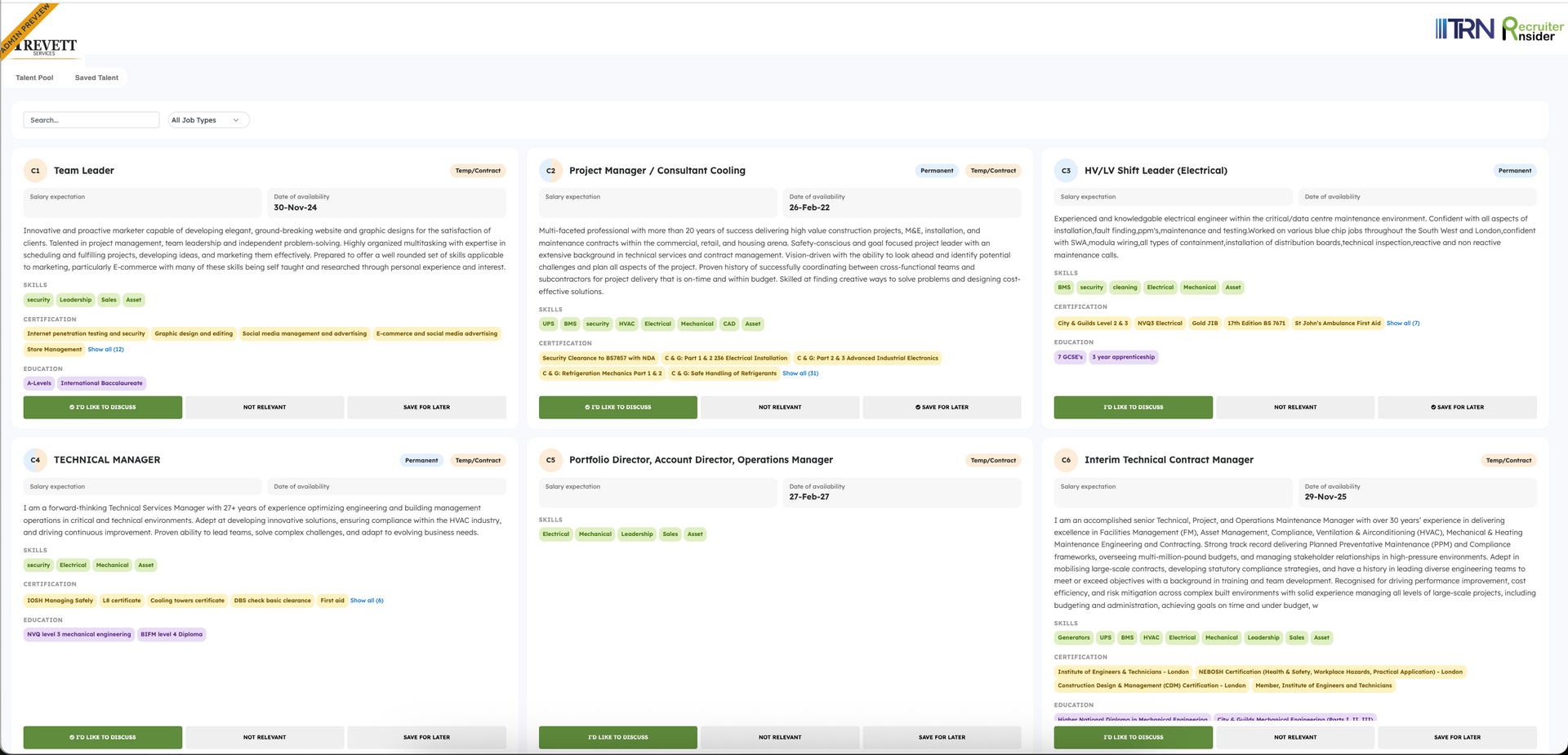
Priority access to talent
Clients see your available candidates and contractors coming off contract before anyone else. No vacancy needed, no out of date lists.
Skills-based control
Uses the skills you already tag in your ATS. Assign a skill to a whole company or to one hiring manager. Set a distance so they only see candidates within reach. Revoke access anytime.
Real hiring signals
See who logs in, how often, who they view, who they save and the alerts they set. Someone logging in ten times is ready to hire. Hiring managers rate your contractors on first impression and overall.
Instant candidate interest
One click on “discuss this candidate” emails the candidate owner straight away, naming the hiring manager and the candidate. Float someone new and matching hiring managers get an email the same day.
Priority access is worth paying for. So charge for it.
Bill your clients a monthly or annual fee for portal access, with unlimited hiring managers on their side.
One client can cover your cost.
Every client after that is recurring revenue.
And you still earn the placements it helps you make.
Live in four steps.
Assign skills
Pick a client, then give the whole company or individual hiring managers access to the skills they hire for.
Share the links
Every hiring manager gets a unique URL. Send it direct, export all links to CSV, or hand them to the TA team.
Clients browse
Hiring managers see anonymised profiles, save candidates, build watch lists and get an email when new talent is floated.
You act on signals
Interest lands in the candidate owner's inbox. Activity tracking shows you who is warming up to hire.
They see the talent. You see the intent.
What your clients see
- Anonymised candidate profiles with a CV summary
- Only the skills you've assigned them
- Contractors coming off contract
- Watch lists and saved candidates
- Alerts and floated candidates in their skills
- Feedback on contractors they've used
- Your agency branding in the banner
What you see
- Full candidate details and who's in the portal
- Views, saves and interest per candidate
- Logins, last login and frequency per hiring manager
- Alerts set and interest requests sent
- Contractor feedback, first impression and overall
- Exactly what any client sees, with filters
- Hide candidates or revoke access anytime
Every desk in your agency.
The portal puts your candidates in front of hiring managers before a role is briefed, and shows you who is getting ready to hire. Here are the channels it opens up.
No vacancy needed. Hiring managers see your candidates in their skills, within reach, the moment you add them. Every login, view and save lands with you.
Float your best candidates
Add your float skill to a strong candidate in your ATS. Every hiring manager with matching skills gets an email the same day. Reverse marketing with no cold calls.
Get in with a happy prospect
A prospect loyal to another agency won't give you a role. They'll take free access to a pool of the people you already work with. Then you see when they log in.
Wake up dormant clients
Give clients who haven't hired in months their own pool. The day they start logging in and saving candidates, you know they're hiring again.
Create roles that don't exist
A hiring manager who clicks “discuss this candidate” with no live vacancy is an opportunistic hire. That's a fee that never comes through a job spec.
Land and expand
One hiring manager uses it, then introduces the next. Every department and site gets its own link and its own skills, inside the same client.
Your placements, now hiring
People you placed years ago now run teams. Give them access to a pool in their skills and they become your next client contact.
Attract better candidates
“Register with us and you're in front of every hiring manager we work with in your skills, this week.” A reason to work with you over five other agencies.
Clients stay with the agency
The relationship sits in your agency's portal, under your branding. When a consultant moves on, the client keeps logging in.
On a contract desk, the agency with someone available first wins the order. The portal shows clients who is free now and who is finishing up, and shows you who is about to need cover.
Seen before they're free. Clients see who's available now and who's coming off contract, in their skills and within reach. Every login, view and save lands with you.
First call when they're short
A manager short on a Monday morning checks the portal instead of ringing three agencies. You're the first call before they've made one.
No gap between contracts
Contractors finishing in the next few weeks show to every matching hiring manager. They go straight into the next role, with no time on the bench.
Ready for peak season
Set up a pool for clients ahead of their busy period. Year end, summer projects, the Christmas rush. The people are lined up before the order lands.
Get on the supplier list
Temp buyers run several agencies. Give a new client their own pool and you become the one they check first, with your branding on every login.
Temp to perm conversions
Temps who want a permanent role sit in front of the managers who know their work. One click on “discuss this candidate” starts the conversion fee.
Keep your contractors loyal
Back-to-back work keeps contractors with you. The portal keeps them moving, so they've no reason to register anywhere else.
Attract better contractors
“Work with us and you're in front of every client we work with in your skills.” A reason to pick your agency the next time they're available.
See the order coming
Login spikes, saves and watch lists show which clients are gearing up for a project. Call them before the order goes out to every supplier.
Build unique talent pools for your clients.
Build a pool for a whole client or for one hiring manager. Candidate short market or candidate rich. Contract or perm. Hiring every week or once a year. Here are the different ways you can use it with your clients.
Float any candidate in one tag. Add your float skill to a candidate in your ATS. It never shows on their profile. Hiring managers whose skills match, within your set distance, get an email straight away.
A pool for one hiring manager
Build a pool around the exact skills one person hires for. In a short market every name counts. In a rich market they see just the right few.
Cover before a contract ends
Client knows a contractor won't return? Put candidates with the same skills in their pool. They line up the next person early, often before you've had notice. Feedback on the last one sets the brief.
A bench for hard to find skills
A market map for the skills they struggle to find. Every candidate you know with those skills, in one place. Whether they hire once or twice a year, the bench is ready when they are.
Pitch with a live pool
Give a prospect a pool for their skills before you've placed anyone. They see the depth of your network. You see if they log in. It beats a capability deck.
New project, new site
Client bidding for work or opening a new site? A pool for those skills shows who's out there to staff it, before they commit to a start date. Set a distance from the site and they only see people within reach.
Backfill and succession
Known leavers, retirements and parental leave cover. The hiring manager sees likely replacements before the role is even open.
Passive candidates are the gold
The best candidates aren't applying to jobs, and they're the ones employers want most. When a hiring manager clicks “discuss this candidate”, you've got a real reason to call: “We've got someone who's really interested in you.” People like being wanted. That's how you stay close to the candidates everyone else is chasing.
Six ways to sell exclusivity to your clients.
Your clients already ask who's available. The Talent Pool Portal shows them, live, without a vacancy. Here's how to turn that into priority access they'll pay for, or a reason to give you the roles.
First look window
New available candidates appear in their portal 48 to 72 hours before anyone else sees them.
“You see them before the market does.”
Access for exclusivity
Portal access free or discounted, in return for exclusivity on their roles in that skill area.
“Give us the roles. We'll give you the keys to the pool.”
One client per patch
Priority status goes to one client per sector and region. Location matching keeps candidates inside their patch. Scarcity does the selling.
“We're offering this to one civils contractor in the North West. Want it?”
Your alumni pool
Contractors they've already used, ring-fenced so only they see them. They invested in getting them up to speed, so they get first call on rehiring. Their feedback tells you who they'd have back.
“Your people, back on site without starting from scratch.”
Contractor early warning
See contractors 4 to 6 weeks before their current contract ends, before they hit the market.
“Your next project start date is covered before it's a problem.”
First refusal
Add your float skill to a candidate in your ATS. Hiring managers with matching skills get an email before anyone else hears about them, with a set window to say yes or pass before it goes wider.
“Every candidate we float in your space comes to you first.”
Agree the terms upfront. Spell out what exclusivity covers: the time window, the skill set and the region.
Want to see it with your own pool?
Let's find 20 minutes.